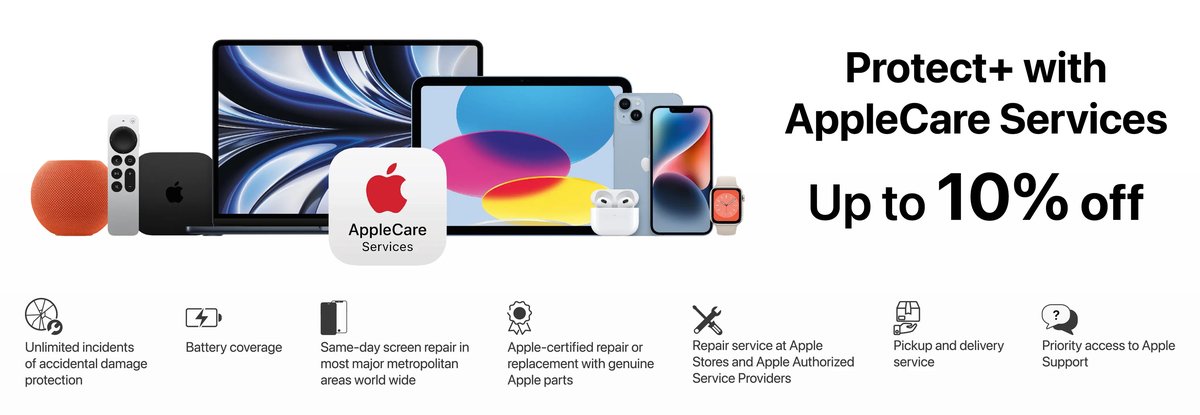
You just bought a brand-new Apple device – perhaps the latest iPhone, a sleek MacBook Pro, or even the revolutionary Vision Pro. It’s a significant investment, a powerful tool, and a piece of technology that quickly becomes central to your daily life. The thrill of unboxing is real, but a subtle worry often lingers: what if something goes wrong? This isn't just about manufacturing defects, which Apple's standard limited warranty covers for a year. We're talking about the dropped phone, the spilled coffee, the unexpected theft, or the battery that just won't hold a charge like it used to. These are precisely the scenarios where AppleCare is highly recommended, transforming that underlying anxiety into genuine peace of mind.
For many, AppleCare+ goes beyond a simple extended warranty; it's comprehensive protection designed for the unpredictable realities of modern device ownership. Let's dive into when this investment truly pays off.
At a Glance: Why AppleCare+ Might Be Your Device's Best Friend
- Accidents Happen: Unlimited accidental damage protection means common mishaps like cracked screens or liquid spills won't break the bank.
- High Repair Costs: Out-of-warranty repairs for Apple devices can be astronomically expensive, often nearing the cost of a new device.
- Theft and Loss Protection: For mobile devices like iPhones, iPads, and Apple Watch, the option to replace a lost or stolen device is invaluable.
- Priority Tech Support: Get 24/7 direct access to Apple experts for troubleshooting software issues or connectivity problems.
- Battery Service: Ensures your device performs optimally throughout its coverage period if battery capacity dips below 80%.
- Multi-Device Savings: AppleCare One offers significant value for households with multiple eligible Apple devices.
Demystifying AppleCare: Beyond the Basic Warranty
Before we pinpoint specific scenarios, let’s quickly clarify what AppleCare actually entails. When you buy any new Apple product, it comes with Apple's Limited Warranty, which covers manufacturing defects for one year and 90 days of complimentary technical support. This is foundational, but it’s crucial to understand its limitations: it doesn’t cover accidental damage, theft, or loss.
This is where AppleCare+ steps in. Think of it as an upgrade to comprehensive protection. It extends your warranty coverage significantly and, most importantly, includes protection for unlimited incidents of accidental damage, subject to a service fee. It also offers 24/7 priority access to Apple experts and battery service if your device’s capacity falls below 80%.
For iPhones, iPads, and Apple Watch, you can further enhance this with AppleCare+ with Theft and Loss, which adds a layer of security, allowing you to replace a lost or stolen device for a fee, up to two times within a 12-month period.
And for the Apple ecosystem power user, there's AppleCare One. This newer consolidated plan (currently US only) covers up to three eligible Apple devices—from iPhones to Macs to Watches—under a single monthly subscription, with options to add more. It even bundles up to three annual claims for theft and loss for eligible devices.
What AppleCare+ Broadly Covers (and Why It Matters for Recommendations):
- Accidental Damage: This is the big one. Screen damage, liquid spills, bent enclosures – all covered for a service fee.
- Battery Service: If your battery health drops below 80% of its original capacity, Apple will replace it at no additional cost.
- Technical Support: 24/7 priority access to Apple experts for software issues, iCloud, Wi-Fi, and more.
- Included Accessories: Your power adapter, charging cable, and even certain Apple-made accessories (like an Apple Pencil or Magic Keyboard with an iPad) are often covered alongside the main device.
- Theft and Loss (with specific plans): Peace of mind for your most portable and vulnerable devices.
This robust coverage forms the basis for our recommendations. It's not just about a product breaking; it's about the financial and operational impact of that breakage.
The High-Stakes Scenarios: Where AppleCare+ Is Practically Essential
Some Apple devices, due to their nature, cost, or how they're used, present a clear case for AppleCare+. These are the situations where the risk of an expensive, uncovered incident is highest, and the impact on your life or work would be most severe.
Your Indispensable iPhone: Always at Risk, Always in Hand
Let's face it: your iPhone is probably your most frequently handled and thus most vulnerable device. It’s always with you – pulled out in cafes, jostled on commutes, used while walking, running, or even cooking. This constant interaction creates an inherent, unavoidable risk.
Why AppleCare+ for iPhone is Practically a Must:
- Extreme Portability & Usage: The more you handle something, the higher the chance of dropping it. A single slip can lead to a shattered screen or a dented enclosure, repairs for which can cost hundreds of dollars out-of-pocket (e.g., $29 for screen damage with AppleCare+ vs. $329+ without, depending on the model).
- High Replacement Cost: iPhones are expensive. Replacing a damaged device outright is a significant financial hit.
- Theft and Loss Vulnerability: iPhones are unfortunately prime targets for theft. The AppleCare+ with Theft and Loss plan offers a critical safety net, allowing you to replace a lost or stolen device for a much lower fee ($149) than buying a new one. This is especially vital for commuters, travelers, or anyone living in a high-density urban environment.
- Dependence on Daily Life: For most, an iPhone is central to communication, navigation, banking, and more. Downtime for repairs can be highly disruptive, and AppleCare+ helps expedite the service process.
Mini Example: Imagine your new iPhone 17 Pro Max slips from your hand onto concrete, shattering the ceramic shield display. Without AppleCare+, you’re looking at a repair bill that could easily hit the $300-$400 range, or even more for other damage. With AppleCare+, that repair is just $29, a fraction of the cost. If that phone were stolen, the out-of-pocket cost for a replacement would be hundreds, even over a thousand dollars; with AppleCare+ with Theft and Loss, it's a manageable $149.
The Mobile Workhorse: Mac Laptops (MacBook Air/Pro)
MacBooks are designed for portability, often traveling between home, office, campus, and cafes. This mobility, while convenient, inherently exposes them to greater risk.
Why AppleCare+ for Mac Laptops is a Smart Investment:
- High Cost & Complex Repairs: MacBooks are premium devices with intricate components. A logic board replacement or a new Retina display can run into hundreds, sometimes thousands, of dollars if not covered. A screen repair alone can be $400-$800 without AppleCare+.
- Liquid Damage is a Nightmare: One of the most common and devastating forms of accidental damage is liquid spills. Without AppleCare+, liquid damage often leads to an expensive logic board replacement or, worse, a total write-off. With AppleCare+, a liquid damage repair is capped at $299.
- Student Essential: Students often carry their MacBooks everywhere, often in backpacks that get bumped around. Late-night study sessions can lead to coffee spills. AppleCare+ offers critical protection for a student's most vital academic tool.
- Professional Reliance: For freelancers, designers, developers, or anyone whose livelihood depends on their MacBook, unexpected downtime due to damage isn't just an inconvenience; it's a loss of income. Expedited repair services from AppleCare+ are crucial.
Mini Example: A busy student rushes between classes, and their MacBook Air takes an unfortunate tumble, bending the enclosure and damaging the display. Without AppleCare+, a full repair could easily cost $500-$800, potentially sidelining them for weeks. With AppleCare+, the cost is $299 for "other accidental damage," getting them back up and running without breaking their budget.
The Cutting-Edge Investment: Apple Vision Pro
As Apple’s newest and most expensive product, the Vision Pro is in a league of its own when it comes to recommended protection. Its nature as a wearable device, constantly being put on and taken off, dramatically increases its exposure to accidental damage.
Why AppleCare+ for Apple Vision Pro is Highly Recommended:
- Exorbitant Cost: With an initial price tag running into thousands of dollars, any repair becomes disproportionately expensive. A simple screen repair could be a substantial financial burden.
- Frequent Handling: Unlike a stationary computer, the Vision Pro is constantly handled, adjusted, and stored, creating numerous opportunities for drops, bumps, or scratches.
- Delicate Components: The complex array of displays, sensors, and cameras are highly sophisticated and potentially fragile. Damage to these core components would necessitate extremely costly repairs.
- New Technology: As a relatively new device category, repair infrastructure and third-party repair options might be limited, making Apple's direct service even more critical.
Mini Example: While showing off your new Apple Vision Pro to a friend, it slips from your grasp and hits the floor, cracking one of the delicate external displays. Without AppleCare+, you might be facing a repair bill exceeding $1,000. With AppleCare+, "other accidental damage" is $299, and accessory damage is $29. This is a no-brainer for such a premium, high-risk device.
Situational Recommendations: When Usage Dictates Protection
Beyond the universal high-risk devices, certain usage patterns or specific product types also strongly favor AppleCare+.
iPads: From Playroom to Professional Toolkit
iPads fall into a unique category. While some are stationary home entertainment devices, others are constantly on the go or in the hands of children.
Why AppleCare+ for iPads Can Be Essential:
- For Children's Use: If an iPad is primarily used by kids, accidental damage is not a matter of "if," but "when." AppleCare+ for a child's iPad is practically mandatory.
- Fieldwork & Creative Professionals: Artists, photographers, construction supervisors, or anyone using an iPad Pro in the field for drawing, design, or data collection will find their device exposed to bumps, drops, and spills. The Apple Pencil and Magic Keyboard (often covered alongside) are also vulnerable.
- Expensive Models (iPad Pro/Air): Higher-end iPads, especially with cellular connectivity, can be nearly as expensive as some MacBooks. Their repair costs are substantial ($29 for screen, $49 for other damage with AppleCare+).
- Students: Like MacBooks, iPads are increasingly common tools in education, sharing similar risks of portability and campus life.
Mini Example: An architect using an iPad Pro 12.9-inch on a construction site accidentally drops it. The large screen cracks. Without AppleCare+, replacing that ProMotion Liquid Retina XDR display could cost over $500. With AppleCare+, it's a mere $29.
Power Users & Professionals: Mac Studio, Mac Pro, Studio Display
While desktop Macs and displays are generally stationary, their high cost and critical role in professional workflows make AppleCare+ a worthwhile consideration, especially for mission-critical setups.
Why AppleCare+ for High-End Desktops & Displays is Often Recommended:
- Mission-Critical Workstations: For professionals who rely on a Mac Studio or Mac Pro for their livelihood (video editing, graphic design, software development), any downtime is catastrophic. AppleCare+ offers expedited service and direct access to expert support.
- Extremely High Initial Investment: These are top-tier machines with price tags that can run into tens of thousands. Even a rare component failure or an accidental spill during intense work sessions can lead to repairs costing thousands without coverage.
- Studio Display: This professional display boasts an expensive 5K Retina screen. While stationary, accidents can still happen (e.g., something falling onto the screen, power surge damage). A screen repair for the Studio Display would be incredibly expensive out of warranty ($99 with AppleCare+ for screen/enclosure damage).
Mini Example: A graphic designer's Mac Studio, while sitting on their desk, suddenly stops working due to an internal power supply issue not covered by the standard warranty's one-year limit. An out-of-warranty repair could be several hundred dollars. With AppleCare+, it's covered for a service fee ($299 for other accidental damage).
The Multi-Device Maestro: Embracing AppleCare One
For individuals or families deeply entrenched in the Apple ecosystem, AppleCare One presents a compelling value proposition.
Why AppleCare One is a Game-Changer:
- Cost Savings for Multiple Devices: If you own three or more eligible Apple devices (e.g., iPhone, iPad, Apple Watch, Mac), AppleCare One can be significantly cheaper than purchasing individual AppleCare+ plans. For $19.99/month, it covers up to three devices.
- Simplified Management: One plan, one bill, one expiration date to track. It streamlines the protection for your entire personal Apple ecosystem.
- Consolidated Theft and Loss: It includes up to three annual claims for theft and loss across your covered iPhones, iPads, and Apple Watches, adding immense value for households with multiple mobile devices.
- Family Plans: While it's a per-user plan tied to an Apple ID, it often makes sense for a primary user to cover their core devices, with potential for family members to be added at $5.99/month per additional device.
Mini Example: You have an iPhone 17 Pro Max ($13.99/month for AppleCare+), an iPad Air ($7.99/month for AppleCare+), and an Apple Watch Ultra ($3.99/month for AppleCare+). Individually, that’s $25.97/month. AppleCare One covers all three for $19.99/month, saving you almost $6 per month, plus it includes theft and loss for the iPhone, iPad, and Watch. The savings can be substantial over the plan's duration.
Calculating the "Worth It" Factor: A Deeper Look
Deciding if AppleCare+ is "worth it" boils down to a personal risk assessment and a comparison of potential costs.
The Cost of Catastrophe:
Let’s be blunt: Apple repairs outside of warranty are expensive. A new iPhone screen can be $279-$329. A logic board replacement on a MacBook can hit $1000+. A cracked iPad screen without AppleCare+ can easily be $300-$500 depending on the model. Compare these figures to the AppleCare+ service fees:
- iPhone: $29 (screen/back glass), $99 (other damage), $149 (lost/stolen).
- iPad: $29 (screen), $49 (other damage).
- Mac/Apple Display: $99 (screen/enclosure), $299 (other accidental damage).
- Apple Watch: $69-$79 (repair), $119 (lost/stolen).
- Vision Pro: $29 (accessories damage), $299 (other accidental damage).
Even after paying the monthly or annual AppleCare+ premium, a single incident of accidental damage often makes the plan pay for itself. Two incidents almost always guarantee it.
Unlimited Accidental Damage Protection:
Apple’s shift to unlimited accidental damage protection (from the previous limit of two incidents) significantly increases the value proposition. For the truly accident-prone, or for devices used in high-risk environments, this is a game-changer. You no longer have to worry about "saving" your claims for a truly catastrophic event.
Beyond Physical Damage: The Value of Peace of Mind:
AppleCare+ isn't just about cracked screens. It also covers battery service if capacity falls below 80% (a common issue as devices age), and it provides priority access to Apple's expert technical support. This means if you're struggling with a software glitch, a connectivity problem, or an iCloud issue, you get direct access to someone who can help, avoiding potentially frustrating and time-consuming troubleshooting on your own. For professionals, this means minimal downtime. For everyday users, it means less tech frustration.
Resale Value:
While harder to quantify, a device still under active AppleCare+ coverage can sometimes fetch a slightly higher resale price. It offers the buyer confidence in the device's condition and continued protection, especially if the coverage is transferable.
When You Might Consider Saving Your Pennies: Less Critical Scenarios
While AppleCare+ offers compelling benefits, it’s not always a universally necessary investment for every single Apple product you own. For certain devices, the cost-benefit analysis might lean towards skipping the coverage.
The Stationary Sentinels: Desktop Macs & Apple TV
Devices that rarely move tend to have a much lower risk of accidental damage.
- Desktop Macs (iMac, Mac mini, Mac Studio, Mac Pro): Unless you're constantly reconfiguring your setup or working in a chaotic environment, these machines typically sit safely on a desk. Their primary risks are power surges (which might be covered by homeowners' insurance or surge protectors) or internal component failures, which are less common after the initial limited warranty period. For these, consider AppleCare+ only if the device is extremely expensive (like a high-end Mac Pro) and mission-critical for your livelihood.
- Apple TV & HomePod: These are designed to be "set it and forget it" devices. They sit in one place, out of harm's way, and are rarely handled. They also have relatively lower replacement costs (e.g., Apple TV 4K for $129-$149, HomePod mini for $99). The repair fee for an Apple TV or HomePod mini with AppleCare+ is $15. Given their durability and stationary nature, AppleCare+ is generally not recommended for these devices.
Wrist-Worn & Ear-Bound: Apple Watch (Standard) & AirPods
These personal accessories are generally quite resilient or have manageable replacement costs.
- Apple Watch (Standard Models): While constantly worn, Apple Watches are built with durability in mind. Most people keep them on their wrist, limiting drop risks. For standard Aluminum models, the replacement cost might be close enough to an AppleCare+ premium plus service fee that it makes less financial sense, especially if you upgrade frequently. However, for the more expensive Stainless Steel or Titanium models, or the Ultra model (repair fee $79, theft/loss $119), the calculus might shift.
- AirPods (and Beats Headphones): These are surprisingly durable for their size. While easy to lose one (which AppleCare+ doesn’t directly cover, though individual replacements are possible), they're less prone to catastrophic accidental damage that would necessitate a full repair claim. The repair fee for AirPods is $29, while replacing a single AirPod is $69. Given their relatively low cost compared to an iPhone or MacBook, AppleCare+ is often skipped here.
The "Calculated Risk" Taker
If you are genuinely meticulous with your devices, always use cases, and operate in very controlled environments, you might decide to forego AppleCare+. However, this is a calculated risk. Accidents are unpredictable, and even the most careful user can have an unfortunate moment. This is a decision best made for less expensive, non-essential devices where an unexpected repair or replacement wouldn't cause significant financial hardship or disruption.
Your AppleCare Roadmap: Practical Steps & Key Information
Once you've decided AppleCare+ is right for you, knowing how to manage and access it is crucial.
Checking Your Current Coverage
Apple makes it easy to see your warranty status:
- On iOS/iPadOS Devices (iPhone, iPad, Vision Pro): Go to
Settings>General>AppleCare & Warranty. Select your device to see its coverage status and expiration date. - On Mac: Click the
Apple iconin the menu bar >About This Mac. Your serial number will be listed. You can then visit Apple's "Check Coverage" website and enter your serial number. - For Other Devices (Apple Watch, Apple TV, HomePod, AirPods): You'll generally find the serial number in their respective settings menus or companion apps (e.g., Watch app for Apple Watch, Home app for HomePod). Once you have the serial number, use Apple's "Check Coverage" website.
Purchasing or Extending AppleCare+
You have a few options for getting coverage:
- At Checkout: The easiest way is to add AppleCare+ when you purchase a new device online or in-store.
- Within 60 Days of Purchase: If you didn't buy it immediately, you can still add AppleCare+ directly on your device (for iPhone/iPad/Vision Pro:
Settings>General>About>Add AppleCare+ Coverage) or by visiting an Apple Store (where a diagnostic might be run). You can also do it online or by phone. - Extending Existing Coverage: In some regions, for certain devices, you can extend your AppleCare+ plan within 45 days of its expiration, usually via your My Support page or by contacting Apple Support. This allows you to maintain continuous protection.
Understanding Service Fees
Remember, while AppleCare+ covers accidental damage, there's still a service fee you pay per incident. These fees are significantly lower than out-of-warranty repair costs, but they are an additional cost on top of your subscription. Always factor these into your "worth it" calculation.
Quick Glance at Common Service Fees:
- iPhone: Screen/Back Glass: $29 | Other Damage: $99 | Lost/Stolen: $149
- iPad: Screen Damage: $29 | Other Damage: $49
- Mac/Apple Display: Screen/External Enclosure: $99 | Other Accidental Damage: $299
- Apple Watch: Repair: $69 (standard) / $79 (Ultra) | Lost/Stolen: $119
- Vision Pro: Accessories Damage: $29 | Other Accidental Damage: $299
- Apple TV/HomePod mini: Repairs: $15
- HomePod: Repair: $39
- Headphones (AirPods, Pro, Max, Beats): Repair: $29
Dispelling Common Myths About Device Protection
Misconceptions about extended warranties often deter people from getting valuable protection. Let's clear a few up.
- "My credit card will cover it." While some premium credit cards offer extended warranties or purchase protection, they are rarely as comprehensive as AppleCare+. Credit card coverage usually only extends the manufacturer's warranty (meaning no accidental damage), has lower claim limits, and can be more difficult to process. Always read the fine print; it's almost never a true substitute for AppleCare+.
- "I'm careful, I've never broken a device." Congratulations, you're lucky! But accidents are, by definition, unpredictable. A moment of distraction, a slippery surface, a crowded space – all it takes is one incident to turn an expensive device into a paperweight. AppleCare+ is insurance against the unexpected, not a punishment for clumsiness.
- "It's just an insurance scam, they want your money." While extended warranties benefit companies, AppleCare+ offers genuine, tangible value, especially with its unlimited accidental damage protection. The cost savings on a single major repair can far outweigh the premium, and the expedited service and expert support are real benefits, not just sales tactics. For the scenarios we've outlined, it’s a legitimate service agreement that often proves its worth.
Making Your Informed Decision: A Final Word of Advice
Ultimately, the decision to purchase AppleCare+ (or AppleCare One) is a personal one, weighing your risk tolerance, budget, and device usage against the cost of the plan. However, by carefully considering the scenarios where AppleCare is highly recommended, you can make a choice that truly protects your valuable technology and provides peace of mind.
Ask yourself these key questions for each of your Apple devices:
- How much do I rely on this device? Is it mission-critical for work, school, or daily communication?
- How often do I handle or transport it? Is it stationary or constantly on the go?
- What's my personal "accident proneness"? Am I generally careful, or do mishaps tend to happen?
- Can I comfortably afford the full out-of-warranty repair or replacement cost if something goes wrong?
- What's the cost of not having the device for an extended period if it needs repair?
For devices like iPhones, Mac laptops, and the Vision Pro – and certainly for multi-device households considering AppleCare One – the comprehensive protection, expedited service, and cost savings on potential repairs make AppleCare+ a highly recommended, often essential, investment. Don't let an unfortunate accident turn your cutting-edge tech into a costly problem; equip it with the best defense available.